Showing posts with label keys. Show all posts
Showing posts with label keys. Show all posts
Saturday, August 13, 2016
Laptops Recovery Keys
Laptops Recovery Keys
Notebooks Recovery Keys:
Acer – Alt + F10
Asus – F9
Dell – Ctrl + F11
EI Systems - F10 or Alt + F10
Fujitsu - F12 or Alt + F11
HP / Compaq – F10 or F11
Lenovo / IBM Thinkpad – F11
MSI – F3
Packard Bell - F11 or Alt + F10
Samsung – F4
Sony VAIO – F10
Toshiba – F8 or 0 (not numpad)
Source (and read more about recovery proccess at certain types):
wintips.org
wintips.org
Available link for download

Friday, August 12, 2016
Function keys to enter the BIOS Boot Menu
Function keys to enter the BIOS Boot Menu
System BIOS boot keys for laptops and desktops
Related article: Laptops Recovery Function Keys
| Manufacturer | Type | Models | Boot Menu |
| Acer | | | Esc, F12, F9 |
| Acer | netbook | Aspire One zg5, zg8 | F12 |
| Acer | netbook | Aspire Timeline | F12 |
| Acer | netbook | Aspire v3, v5, v7 | F12 |
| Apple | | After 2006 | Option |
| Asus | desktop | | F8 |
| Asus | laptop | VivoBook f200ca, f202e, q200e, s200e, s400ca, s500ca, u38n, v500ca, v550ca, v551, x200ca, x202e, x550ca, z202e | Esc |
| Asus | laptop | N550JV, N750JV, N550LF, Rog g750jh, Rog g750jw, Rog g750jx | Esc |
| Asus | laptop | Zenbook Infinity ux301, Infinity ux301la, Prime ux31a, Prime ux32vd, R509C, Taichi 21, Touch u500vz, Transformer Book TX300 | Esc |
| Asus | notebook | k25f, k35e, k34u, k35u, k43u, k46cb, k52f, k53e, k55a, k60ij, k70ab, k72f, k73e, k73s, k84l, k93sm, k93sv, k95vb, k501, k601, R503C, x32a, x35u, x54c, x61g, x64c, x64v, x75a, x83v, x83vb, x90, x93sv, x95gl, x101ch, x102ba, x200ca, x202e, x301a, x401a, x401u, x501a, x502c, x750ja | F8 |
| Asus | netbook | Eee PC 1015, 1025c | Esc |
| Compaq | | Presario | Esc, F9 |
| Dell | desktop | Dimension, Inspiron, Latitude, Optiplex | F12 |
| Dell | desktop | Available link for download
Read more »
Sunday, July 31, 2016Sony VAIO VGN TZ step by step installation of all drivers for Windows 7 Windows 8 For proper operation of all keys and devicesSony VAIO VGN TZ step by step installation of all drivers for Windows 7 Windows 8 For proper operation of all keys and devicesTZ is a class ultraportables class Hi-End. Typically, these laptops are targeted either women or the businessmen who spend a lot of time in traveling and business trips. The main characteristic of this class of laptops are small and lightweight. And all the other parameters of the laptop, for example, the configuration or ergonomics, formed from the point of view of preservation of minimal size and weight. 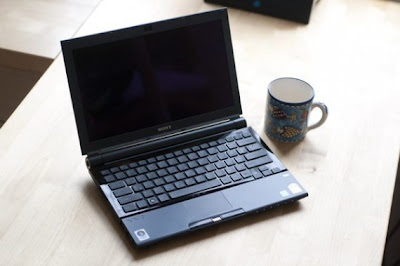 Sony VAIO VGN-TZ ALL DRIVERS For WINDOWS 7 WINDOWS 8: Link 1: Download Letitbit.net Link 2: Download Turbobit.net Warning if the link broken or not working , you can write to me about it and I will try to solve this problem. Support my group on Facebook.com or Twitter join us! Thank you in advance for your support and that you have chosen my blog. For the most part these notebooks are short-lived work " on his knees " or a brief work " at a party " - the negotiations , etc.Iron: Platform Intel Centrino Duo, Chipset Mobile Intel 945PM Express The Intel Core 2 Duo U7500 (TZ2RMN / N) with a clock speed of 1.06 GHz or Intel Core 2 Duo U7600 processor with a clock speed of 1.2 GHz, FSB 533 MHz and 2048 KB L2 cache Memory 1024 MB DDR-II 667 Nanya (TZ2RMN / N) , expandable to 2 GB. Graphics Intel Graphics Media Accelerator 950 c 256 MB HDD Toshiba MK1011 GAH volume of 100 GB, Interface Ultra 4200 rev / min media : Matshita DVD-RAM UJ-852S multi-format , buffer size 2MB , USB interface Display LCD X-black LED technology Diagonal Size (inches ) - 11.1 , format resolution - 1366x768 Audio Realtek ALC262 @ Intel 82801GBM ICH7-M - High Definition Audio Controller, A slot for memory cards such as Memory Stick Duo, Memory Stick PRO Duo and SD WEB 0.3 megapixel camera . 320x240 interfaces : Wi-Fi (WLAN 802.11b / g), Built-in Bluetooth ( Version ) 2.0 + EDR Network Ethernet 10Base-T/100Base-TX/1000Base-T 4 Pin i.LINK (IEEE1394), Express card 34mm , 2x USB 2.0, VGA, RJ- 11, RJ- 45 Features: The fingerprint scanner Protect your hard drive shock G-sensor electronic protection HDD shock Dimensions in mm 277h198 , 2x22 ,5 -29 , 8 Weight 1.19 You should know that you need to be patient and spend a lot of time for driver installation and configuration of this laptop ! To successfully install and guaranteed work Fn buttons and getting the maximum duration of the work required to comply with strict sequence of installing the drivers and utilities are already noticeable . I warn you in advance that when it went on sale a laptop on board stood OS Windows VISTA. In principle drivers for Windows Vista compatible at 90 % with the operating system Windows 7. 1. Motherboard - Driver motherboard. - Intel PCI IDE Controller 2 . Audio driver audikarty . - Realtek High Definition Audio Driver 3 . Sony HDD Protection Filter Driver driver hard disk controller . - Sony HDD Protection Filter Driver 4 . VIDEO Intel Graphics Media Accelerator 950 video card driver . PCI VEN_8086 & DEV_27A2 & SUBSYS_8215104D 5 . Bluetooth driver bluetooth. - Broadcom Bluetooth L2CAP Driver Installation % BTWL2CAP.DeviceDesc% = BTWL2CAPST, BTHENUM {6E0C8F4C-D928- 4852 -B6B2-F0F0E0D126FA} 6. LAN Network Card - Ethernet Marvell Yukon Ethernet Controller PCI VEN_1148 & DEV_4320 & SUBSYS_29161259 PCI VEN_1148 & DEV_9E00 & SUBSYS_92001148 7. Card Reader card reader standard Memory Stick and SD. Potrebudetsya manual installation via Device Manager . - MS RICOH SD / MM Card and Memory Stick driver PCI VEN_1180 & DEV_0592 - SD RICOH SD / MM Card driver PCI VEN_1180 & DEV_0843 8. SFEP Sony Firmware Extension Parser Device Driver with a sly name ID SNY5001 ( 32 and 64bit). This will require manual review all of the devices ( known and unknown ) in the " Device Manager " with the name of the ID equipment. Perhaps it will take a lot of time ! But its very important to do without these drivers will not work button! How to see the device ID of equipment in the " Device Manager " , right- click the properties in the dialog box , select the tab " Information" in the properties window , select " ID equipment " and see if our driver called SNY5001, then go ahead and install the driver downloaded from the Internet if another name for ID equipment , then we do nothing , we close and continue to seek further. - Sony Firmware Extension Parser Device Driver 8.0.1.2 8.1. SPIC Sony Programmable I / O Control his ID SNY601. Installation is similar to Sny5001 9. Touchpad there usually is not any problems during installation. Alps Pointing-device Driver 10 . Wi-Fi Intel (R) PRO / Wireless 2915ABG Network Connection Adapter PCI VEN_8086 & DEV_4220 & SUBSYS_27018086 10.1 Modem Rockwell Semiconductor Systems HDAUDIO FUNC_02 & VEN_14F1 & DEV_2BFA & SUBSYS_104D0200 11. WEB camera . Manual Installation is similar to claim 8 (Sny5001) - Sony Visual Communication Camera VGP-VCC7 R5U870 12 fingerprint reader . Manual Installation is similar to claim 8 (Sny5001) TcUsb.Dev, USB VID_0483 & PID_2015 Only after the successful installation of all drivers turn to install these tools in a strict sequence : 13. Sony Shared Library and restart your computer ! - Sony Shared Library 5.7.0.06070 14. VAIO Event Service 15. Set the Setting Utility Series and restart your computer ! 16 VAIO Control Center 17 VAIO Power Management 18. VAIO Smart Network of your choice If you like this article has helped you can thank the authors purse WebMoney Z276373925574 If you for some reason it does not work or you are the unwilling to spend their time - please contact us for help . Myproizvodim complete customization , installation and solve any problems notebooks Sony VAIO. Anofriev Gregory Dnepropetrovsk E-mail: grisha.anofriev@gmail.com Tags : SONY VAIO, VGN-TZ121, VGN-TZ13, VGN-TZ130N / B, VGN-TZ131, VGN-TZ132 / N, VGN-TZ132N, VGN-TZ150N / B, VGN-TZ150N / N, VGN-TZ160CB VGN- TZ160N / B, VGN TZ16GN / B VGN-TZ16N, VGN-TZ16N / B, VGN-TZ17 / N, VGN-TZ170N / B, VGN-TZ170N / N, VGN-TZ17GN / B VGN-TZ17N, VGN-TZ18 / N , VGN-TZ185N/WC, VGN-TZ18GN / X, VGN-TZ18N, VGN-TZ190N / B GN-TZ191N/XC, VGN-TZ195N/XC VGN-TZ27 / N, VGN-TZ27N, VGN-TZ28 / N, VGN -TZ28N, VGN-TZ33 / B, VGN-TZ33 / N, VGN-TZ33 / W, VGN-TZ37N / G, VGN-TZ37N / P VGN-TZ37N / R, VGN-TZ37N / X GN-TZ38N / X, VGN -TZ50B, VGN-TZ90HS, VGN-TZ90NS, VGN-TZ90S, VGN-TZ10MN/N ,VGN-TZ10XN/B, VGN-TZ11MN/N, VGN-TZ11VN/X ,VGN-TZ11XN/B ,VGN-TZ12MN/N ,VGN-TZ12VN/X ,VGN-TZ1RMN/N ,VGN-TZ1RXN/B ,VGN-TZ20MN/N ,VGN-TZ20WN/B ,VGN-TZ21MN/N ,VGN-TZ21VN/R ,VGN-TZ21VN/X ,VGN-TZ21WN/B ,VGN-TZ21XN/B ,VGN-TZ22MN/N ,VGN-TZ22VN/X ,VGN-TZ2AWN/B, VGN-TZ2RMN/N ,VGN-TZ2RXN/B ,VGN-TZ31MN/N ,VGN-TZ31MN/P ,VGN-TZ31MN/W ,TZ31VN/R ,VGN-TZ31VN/X ,VGN-TZ31WN/B ,VGN-TZ31XN/B ,VGN-TZ32VN/X ,VGN-TZ3AWN/B, VGN-TZ3RMN/N ,VGN-TZ3RXN/B Available link for download
Subscribe to:
Posts (Atom)
|