Showing posts with label all. Show all posts
Showing posts with label all. Show all posts
Tuesday, September 13, 2016
All in one Disk Partition Manager Software freeware and allows private and commercial use
All in one Disk Partition Manager Software freeware and allows private and commercial use
AOMEI Partition Assistant Standard Edition is free multilingual disk partition manager and free for private and commercial use for Windows 2000 / XP / Vista / Windows 7 32 / 64 bit and the latest Windows 8. It support multi-language, include: English, French, Spanish, German, Italian, Japanese, Portuguese, Hungarian, Polish, Russian, etc.
Home page:
http://www.disk-partition.com/product.html
Download link:
http://www.disk-partition.com/download-home.html
Available link for download

Monday, September 12, 2016
10 Tips And Tricks That All Windows Users Would Love To Know
10 Tips And Tricks That All Windows Users Would Love To Know

Making Shortcut for Running your Favorite Programs:
If you think that doubling tapping the programs icon is worthless and time wastage then this is the best trick for you to open programs fast and easy. Right click on the program icon and then go to properties. There go to the shortcut tab and click on the Shortcut line. It will show you “none”. Press any desired key you like to assign for the launching of that program. After that the line will generate the shortcut starting with “Ctrl + Alt + your desired key. Click Apply and you are ready to launch that program just from your desktop.
Search It Directly from the Taskbar:
Want to make it easier for viewing links. Well, this trick will definitely come in handy. Right click the taskbar and select properties, in the toolbars section select the things you would like on your taskbar and check the Address box, click Apply. Now you can search any link directly from the taskbar in your default browser. Just type a link and the search result will show up in a window in the default browser.
Must Read: Useful Notepad Tricks For Windows 2015
Toggle between running Programs on the Desktop:
I think this won’t be new to many people as this functions is inherited from Windows XP. But its still there in 7 and 8.1. Just press alt button on the keyboard and start press in TAB key, a box showing the running programs will appear. Now you can easily toggle between programs, without touching the taskbar.
Increase no, of items in the jump lists:
Want to have a lot of recents in your jump list. Goto Taskbar properties> jump lists. Here just select the number of recent items you want and just click apply.
Search More Effectively:
Most of windows 8 users might miss the 7 and XP style of searching. But 8.1 might surprise you with its more effective search trick. Just click the search tab in the top right corner of the Windows Explorer. After clicking it search tools will appear in the top left section in the menu bar just besides the view option. Now you can search with many fancy filters this will definitely make your search more effective. And it’s much better than the previous search tools given in previous versions of windows.
Must Read: How To Paste Any Code or Command In Cmd By Using CTRL+V
Aero Snap:
Now this maybe a very little aspect but a very useful one for multitasking users. You can easily size two windows with just one drag or by one or two commands on the key board. Just drag in any window to the left or right of the screen and it will cover exactly the half of that side of screen and you can do the same for the rest of the screen. Want to use key board then open the window and press windows key + right arrow for the right side and left arrow key for the left side.
Make the most from Right Click Options:
Usually when you right click a folder or item it will give you many options and also the sendto options gives you some options to. But what if I tell you that you can increase the right click options as well as the sendto options. Just press and hold the sift key and then press the right click the item and you’ll see many options in the right click menu as well as the sendto menu will also give you many locations.
File Path copying:
Want to copy a file path of a certain item. Just hold down the shift key and right click that item and click on the copy as path option. Now, your file path is copied to clip board. For example, if you want to tell how to get to that folders location or just want to upload to an online source just paste the path and make your life easy.
Launch Taskbar Programs Directly From The Keyboard:
Fed up of clicking the taskbar programs. Well, here’s a new trick that will surely help you. To launch any program directly from the taskbar, just press the Windows key + the number on which it is present on the taskbar. For instance, in the picture here I would like to open Mozilla. So, I will press Windows Key + 5 key and Mozilla will launch. Neat isn’t it.
Must Read: How To Use Android Apps On PC?
New Window launching:
Want to launch another window of a running program. Let’s say for Mozilla you want to open a new window. Just hold down the shift key and either click the program that is opened previously or press shift + Windows key + the no. of tab on the taskbar and there you go a new tab. Its sure to save your time.
Available link for download
Wednesday, August 24, 2016
Sony VAIO VGN SZ drivers are installed correctly to work all the buttons Windows 7 Windows 8
Sony VAIO VGN SZ drivers are installed correctly to work all the buttons Windows 7 Windows 8
Many have encountered some problems when installing the drivers for the laptop brand Sony VAIO series SZ. After installing all the drivers do not work extra keys, volume, brightness, etc., as well as in the Device Manager displays the number of "unknown devices".

The first is that the manufacturer recommends it to flash BIOS. The new version should download only from the companys website. During firmware money had to be shoved is not what programs , the laptop must be connected to the AC adapter during the firmware after flashing the laptop power off , wait 30 seconds before reconnecting it .
Now you can install the OS in my case it was a Windows 7 x86. Under the C drive I have allocated 60 GB. After installing the operating system to download from the manufacturers website and install all the drivers .
1. Chipset driver materiskoy board
2 . Camera may require manual installation of drivers as computer recognizes the device as «USB output device ." This will require in the " Device Manager " on the right mouse button to click on the «USB output device " will be displayed pop-up menu and choose " Update Driver ... " choose "Browse my computer for driver software " manually then choose "Select a driver from a list of device drivers " select from below " Have Disk "and select the folder with the drivers for your Web camera and choose a file with inf in that folder. Typically, this camera models PCGA-UVC10/VC1/VC2, VGP-VCC2/VCC7 need to sort out .
VGP-VCC8_Sony_Visual_Communication_Camera, ID device USB VID_05ca & PID_183B & MI_00
Sony Visual Communication Camera VGP-VCC5 SZ430N, ID device USB VID_05ca & PID_1835 & MI_00
Sony Visual Communication Camera VGP-VCC7, ID device USB VID_05CA & PID_183A & MI_00
Sony Visual Communication Camera VGP-VCC2, ID device USB VID_05CA & PID_1830
Download Letitbit.net Download Download Shareflare.net Sms4file.com Download Vip-file.com
Sony Visual Communication Camera PCGA-UVC10, ID device USB VID_054c & PID_00ab
Sony Visual Communication Camera PCGA-VC1, ID device USB VID_054C & PID_0021
Sony Visual Communication Camera PCGA-VC2, ID device USB VID_054C & PID_003F
3 . Touchpad Manual through the DMZ.
4 . Fingerprint scanner fingers need to manually install the drivers. Installation is similar to Web camera.
5 . Installing the drivers for the integrated graphics card. Switch on the laptop switch mode Stamina. Restart the computer . And begin installing the drivers Intel ® Graphics Media Accelerator.
6. Installing the graphics card drivers . Switch on the laptop switch mode Speed. Restart the computer . And begin installing the drivers Nvidia. If you have problems installing try to manually install the drivers.
7. Memory Stick Card reader is generally not recognized by the computer in the " Device Manager " is displayed as " unknown device ". Require manual installation of drivers . This is usually the drivers of the company Texas Instruments.
8. HDD Protection
9. WiFi
10 . Were tricky to install the drivers from the name SNY5001. This will require manual review all of the devices ( known and unknown ) " Device Manager " with the name of the ID equipment. Perhaps it will take a lot of time ! But its very important to do without these drivers will not work button! How to see the device ID of equipment in the " Device Manager " , right- click the properties in the dialog box , select the tab " Information" in the properties window , select " ID equipment " and see if our driver called SNY5001, then go ahead and install the driver downloaded from the Internet if another name for ID equipment , then we do nothing , we close and continue to seek further.
11. Need to do the same thing with the installation of the driver SNY6001. This will require manual review all of the devices ( known and unknown ) " Device Manager " with the name of the ID equipment. Perhaps it will take a lot of time ! But its very important to do without these drivers will not work button!
12. If your model has a GSM GPRS modem built-in Sony Ericsson will need to install the same drivers
other drivers that may be needed
Infineon Technologies AG Drivers
Toshiba Bluetooth
Infineon Technologies AG Utiliti
FeliCaRW
Only after the successful installation of all drivers turn to install these tools in a strict sequence :
1. Install Sony Shared Library and then restart your computer !
2 . Install Vaio Event Service
3 . Set the Setting Utility Series and restart your computer !
4 . Install VAIO CONTROL CENTER.
Now all the features and keyboard shortcuts work .
Now you need to install all the other utilities .
5.Vaio Power Management
6. Vaio Update 5 (JP Models only) If you have a European or American - swing with acc. sites.
7. Vaio Gate is very ntiresnaya utility . I advise everyone to try!
8. Vaio Care for the System Restore
9. Vaio Hardware Diagnostics
10 . Vaio Camera Capture Utility
11. 1. Protector Suite QL 5.3 utility fingerprint scanner
11.2 . Protector Suite 2009 ( Putting one of 2 ) - some other tool to fingerprint
12. LAN Setting Utility
13. Wireless Switch Setting Utility
If you like this article has helped you can thank the authors purse WebMoney Z276373925574
After all this notebook is ready to go. In order that would make things work the first time it took me 10 days. So do not despair if you do everything right the first time will not work, a little patience and perseverance , and you will thank your laptop .
If you for some reason it does not work or you are the unwilling to spend their time - please contact us for help . Myproizvodim complete customization , installation and solve any problems notebooks Sony VAIO.
download drivers for free
Anofriev Gregory Dnepropetrovsk
E-mail: grisha.anofriev@gmail.com
Tags : Sony VAIO SZ download drivers , brightness buttons do not work Sony VAIO SZ, sony vaio vgn-sz791n, Sony VAIO install all the drivers , sony vaio vgn-sz3sony vaio vgn-sz4, sony vaio vgn-sz430, sony vaio vgn-sz7, sony vaio vgn-sz1, sony vaio vgn-sz750, sony vaio vgn-sz480, sony vaio vgn-sz5, sony vaio sz windows 7 , sony vaio vgn-sz770, sony vaio vgn-sz6, Sony VAIO VGN-SZ proper installation etc , sony vaio vgn-sz650, sony vaio vgn-sz2, VGN-SZ1HP / B, VGN-SZ1HRP / B, VGN-SZ1M / B, VGN-SZ1VP / C, VGN-SZ1XP / C, VGN-SZ1XP/CF, VGN -SZ1XRP / C,
VGN-SZ2HP / B, VGN-SZ2HRP / B, VGN-SZ2M / B, VGN-SZ2VP / X, VGN-SZ2XP / C, VGN-SZ2XP/CF, VGN-SZ2XRP / C, VGN-SZ3HP / B, VGN- SZ3HRP / B, VGN-SZ3HTP / B, VGN-SZ3VP / X, VGN-SZ3VWP / X, VGN-SZ3XP / C, VGN-SZ3XP/CF, VGN-SZ3XRP / C, VGN-SZ3XTP / C, VGN-SZ3XWP / C, VGN-SZ4MN / B, VGN-SZ4MRN / B, VGN-SZ4MTN / B, VGN-SZ4VN / X, VGN-SZ4VRN / X, VGN-SZ4VWN / X, VGN-SZ4XN / C, VGN-SZ4XN/CF, VGN-SZ4XRN / C, VGN-SZ4XTN / C, VGN-SZ4XWN / C, VGN-SZ5MN / B, VGN-SZ5MRN / B, VGN-SZ5MTN / B, VGN-SZ5VN / X, VGN-SZ5VRN / X, VGN- SZ5VWN / X, VGN-SZ5XN / C, VGN-SZ5XRN / C, VGN-SZ5XTN / C, VGN-SZ5XWN / C, VGN-SZ60MN / B, VGN-SZ60WN / C, VGN-SZ61MN / B, VGN-SZ61VN / X, VGN-SZ61WN / C, VGN-SZ61XN / C, VGN-SZ62MN / B, VGN-SZ62WN / C, VGN-SZ6AWN / C, VGN-SZ6RMN / B, VGN-SZ6RVN / X, VGN-SZ6RXN / C, VGN-SZ70M / B, VGN-SZ70WN / C, VGN-SZ71E / B, VGN-SZ71MN / B, VGN-SZ71VN / X, VGN-SZ71WN / C, VGN-SZ71XN / C, VGN-SZ72MN / B, VGN- SZ72WN / X, VGN-SZ7AWN / C, VGN-SZ7RMN / B, VGN-SZ7RVN / X, VGN-SZ7RXN / C,
,VGN-SZ110,VGN-SZ110/B,-SZ120P,VGN-SZ120P/B,VGN-SZ140,VGN-SZ140P,VGN-SZ140PA,VGN-SZ140PC,VGN-SZ140PD,VGN-SZ150P,VGN-SZ150P/C,VGN-SZ160P,VGN-SZ160P/C,VGN-SZ170P,VGN-SZ170P/C,VGN-SZ210P,VGN-SZ210P/B,VGN-SZ220,VGN-SZ230P,VGN-SZ230P/B,VGN-SZ240,VGN-SZ240P,VGN-SZ250P,VGN-SZ250P/C,VGN-SZ260P,VGN-SZ270P,VGN-SZ270P/C,VGN-SZ280P,VGN-SZ280P/C,VGN-SZ281P,VGN-SZ281P/X,VGN-SZ320P,VGN-SZ320P/B,VGN-SZ330P,VGN-SZ330P/B,VGN-SZ340,VGN-SZ340P,VGN-SZ340W,VGN-SZ360P,
VGN-SZ360P/C,VGN-SZ370P,VGN-SZ370P/C,VGN-SZ381P,VGN-SZ390P,VGN-SZ430N,VGN-SZ430N/B,VGN-SZ440,VGN-SZ440E,VGN-SZ440N,VGN-SZ440N22,VGN-SZ450N,VGN-SZ450N/C,VGN-SZ460N,VGN-SZ460N/C,VGN-SZ470N,VGN-SZ470N/C,VGN-SZ480,VGN-SZ480E,VGN-SZ480N,VGN-SZ480NW1,VGN-SZ480NW5,VGN-SZ480NW9,-SZ491N,VGN-SZ491N/X,VGN-SZ640,VGN-SZ640E,VGN-SZ640N,VGN-SZ640N/B,VGN-SZ645P,VGN, SZ645P1,VGN-SZ645P2,VGN-SZ645P3,VGN-SZ645P4,VGN-SZ650N,VGN-SZ650N/C,VGN-SZ651N/C,VGN-SZ660N,VGN-SZ660N/C,VGN-SZ670N,VGN-SZ670N/C,VGN-SZ680,VGN-SZ680E,VGN-SZ680N,VGN-SZ680N/D,VGN-SZ691N,VGN-SZ691N/X,VGN-SZ730E,VGN-SZ730E/C,VGN-SZ740,VGN-SZ740E,
VGN-SZ740EC,VGN-SZ740ED,VGN-SZ740EE,VGN-SZ740EZ,VGN-SZ740N,VGN-SZ740N1,VGN-SZ740U,VGN-SZ750N,VGN-SZ750N/C,VGN-SZ760N,VGN-SZ760N/C,VGN-SZ770N,VGN-SZ770N/C,VGN-SZ780,VGN-SZ780E,VGN-SZ780N,VGN-SZ780U,VGN-SZ791N,VGN-SZ791N/X
The first is that the manufacturer recommends it to flash BIOS. The new version should download only from the companys website. During firmware money had to be shoved is not what programs , the laptop must be connected to the AC adapter during the firmware after flashing the laptop power off , wait 30 seconds before reconnecting it .
Now you can install the OS in my case it was a Windows 7 x86. Under the C drive I have allocated 60 GB. After installing the operating system to download from the manufacturers website and install all the drivers .
Sony VAIO VAIO VGN-SZ ALL DRIVERS For WINDOWS 7 (32bit ? 64bit), WINDOWS 8:
Link 1: Download Letitbit.net
Link 2: Download Turbobit.net
Warning if the link broken or not working , you can write to me about it and I will try to solve this problem.
Warning if the link broken or not working , you can write to me about it and I will try to solve this problem.
Support my group on Facebook.com or Twitter join us! Thank you in advance for your support and that you have chosen my blog.
1. Chipset driver materiskoy board
2 . Camera may require manual installation of drivers as computer recognizes the device as «USB output device ." This will require in the " Device Manager " on the right mouse button to click on the «USB output device " will be displayed pop-up menu and choose " Update Driver ... " choose "Browse my computer for driver software " manually then choose "Select a driver from a list of device drivers " select from below " Have Disk "and select the folder with the drivers for your Web camera and choose a file with inf in that folder. Typically, this camera models PCGA-UVC10/VC1/VC2, VGP-VCC2/VCC7 need to sort out .
VGP-VCC8_Sony_Visual_Communication_Camera, ID device USB VID_05ca & PID_183B & MI_00
Sony Visual Communication Camera VGP-VCC5 SZ430N, ID device USB VID_05ca & PID_1835 & MI_00
Sony Visual Communication Camera VGP-VCC7, ID device USB VID_05CA & PID_183A & MI_00
Sony Visual Communication Camera VGP-VCC2, ID device USB VID_05CA & PID_1830
Download Letitbit.net Download Download Shareflare.net Sms4file.com Download Vip-file.com
Sony Visual Communication Camera PCGA-UVC10, ID device USB VID_054c & PID_00ab
Sony Visual Communication Camera PCGA-VC1, ID device USB VID_054C & PID_0021
Sony Visual Communication Camera PCGA-VC2, ID device USB VID_054C & PID_003F
3 . Touchpad Manual through the DMZ.
4 . Fingerprint scanner fingers need to manually install the drivers. Installation is similar to Web camera.
5 . Installing the drivers for the integrated graphics card. Switch on the laptop switch mode Stamina. Restart the computer . And begin installing the drivers Intel ® Graphics Media Accelerator.
6. Installing the graphics card drivers . Switch on the laptop switch mode Speed. Restart the computer . And begin installing the drivers Nvidia. If you have problems installing try to manually install the drivers.
7. Memory Stick Card reader is generally not recognized by the computer in the " Device Manager " is displayed as " unknown device ". Require manual installation of drivers . This is usually the drivers of the company Texas Instruments.
8. HDD Protection
9. WiFi
10 . Were tricky to install the drivers from the name SNY5001. This will require manual review all of the devices ( known and unknown ) " Device Manager " with the name of the ID equipment. Perhaps it will take a lot of time ! But its very important to do without these drivers will not work button! How to see the device ID of equipment in the " Device Manager " , right- click the properties in the dialog box , select the tab " Information" in the properties window , select " ID equipment " and see if our driver called SNY5001, then go ahead and install the driver downloaded from the Internet if another name for ID equipment , then we do nothing , we close and continue to seek further.
11. Need to do the same thing with the installation of the driver SNY6001. This will require manual review all of the devices ( known and unknown ) " Device Manager " with the name of the ID equipment. Perhaps it will take a lot of time ! But its very important to do without these drivers will not work button!
12. If your model has a GSM GPRS modem built-in Sony Ericsson will need to install the same drivers
other drivers that may be needed
Infineon Technologies AG Drivers
Toshiba Bluetooth
Infineon Technologies AG Utiliti
FeliCaRW
Only after the successful installation of all drivers turn to install these tools in a strict sequence :
1. Install Sony Shared Library and then restart your computer !
2 . Install Vaio Event Service
3 . Set the Setting Utility Series and restart your computer !
4 . Install VAIO CONTROL CENTER.
Now all the features and keyboard shortcuts work .
Now you need to install all the other utilities .
5.Vaio Power Management
6. Vaio Update 5 (JP Models only) If you have a European or American - swing with acc. sites.
7. Vaio Gate is very ntiresnaya utility . I advise everyone to try!
8. Vaio Care for the System Restore
9. Vaio Hardware Diagnostics
10 . Vaio Camera Capture Utility
11. 1. Protector Suite QL 5.3 utility fingerprint scanner
11.2 . Protector Suite 2009 ( Putting one of 2 ) - some other tool to fingerprint
12. LAN Setting Utility
13. Wireless Switch Setting Utility
If you like this article has helped you can thank the authors purse WebMoney Z276373925574
After all this notebook is ready to go. In order that would make things work the first time it took me 10 days. So do not despair if you do everything right the first time will not work, a little patience and perseverance , and you will thank your laptop .
If you for some reason it does not work or you are the unwilling to spend their time - please contact us for help . Myproizvodim complete customization , installation and solve any problems notebooks Sony VAIO.
download drivers for free
Anofriev Gregory Dnepropetrovsk
E-mail: grisha.anofriev@gmail.com
Tags : Sony VAIO SZ download drivers , brightness buttons do not work Sony VAIO SZ, sony vaio vgn-sz791n, Sony VAIO install all the drivers , sony vaio vgn-sz3sony vaio vgn-sz4, sony vaio vgn-sz430, sony vaio vgn-sz7, sony vaio vgn-sz1, sony vaio vgn-sz750, sony vaio vgn-sz480, sony vaio vgn-sz5, sony vaio sz windows 7 , sony vaio vgn-sz770, sony vaio vgn-sz6, Sony VAIO VGN-SZ proper installation etc , sony vaio vgn-sz650, sony vaio vgn-sz2, VGN-SZ1HP / B, VGN-SZ1HRP / B, VGN-SZ1M / B, VGN-SZ1VP / C, VGN-SZ1XP / C, VGN-SZ1XP/CF, VGN -SZ1XRP / C,
VGN-SZ2HP / B, VGN-SZ2HRP / B, VGN-SZ2M / B, VGN-SZ2VP / X, VGN-SZ2XP / C, VGN-SZ2XP/CF, VGN-SZ2XRP / C, VGN-SZ3HP / B, VGN- SZ3HRP / B, VGN-SZ3HTP / B, VGN-SZ3VP / X, VGN-SZ3VWP / X, VGN-SZ3XP / C, VGN-SZ3XP/CF, VGN-SZ3XRP / C, VGN-SZ3XTP / C, VGN-SZ3XWP / C, VGN-SZ4MN / B, VGN-SZ4MRN / B, VGN-SZ4MTN / B, VGN-SZ4VN / X, VGN-SZ4VRN / X, VGN-SZ4VWN / X, VGN-SZ4XN / C, VGN-SZ4XN/CF, VGN-SZ4XRN / C, VGN-SZ4XTN / C, VGN-SZ4XWN / C, VGN-SZ5MN / B, VGN-SZ5MRN / B, VGN-SZ5MTN / B, VGN-SZ5VN / X, VGN-SZ5VRN / X, VGN- SZ5VWN / X, VGN-SZ5XN / C, VGN-SZ5XRN / C, VGN-SZ5XTN / C, VGN-SZ5XWN / C, VGN-SZ60MN / B, VGN-SZ60WN / C, VGN-SZ61MN / B, VGN-SZ61VN / X, VGN-SZ61WN / C, VGN-SZ61XN / C, VGN-SZ62MN / B, VGN-SZ62WN / C, VGN-SZ6AWN / C, VGN-SZ6RMN / B, VGN-SZ6RVN / X, VGN-SZ6RXN / C, VGN-SZ70M / B, VGN-SZ70WN / C, VGN-SZ71E / B, VGN-SZ71MN / B, VGN-SZ71VN / X, VGN-SZ71WN / C, VGN-SZ71XN / C, VGN-SZ72MN / B, VGN- SZ72WN / X, VGN-SZ7AWN / C, VGN-SZ7RMN / B, VGN-SZ7RVN / X, VGN-SZ7RXN / C,
,VGN-SZ110,VGN-SZ110/B,-SZ120P,VGN-SZ120P/B,VGN-SZ140,VGN-SZ140P,VGN-SZ140PA,VGN-SZ140PC,VGN-SZ140PD,VGN-SZ150P,VGN-SZ150P/C,VGN-SZ160P,VGN-SZ160P/C,VGN-SZ170P,VGN-SZ170P/C,VGN-SZ210P,VGN-SZ210P/B,VGN-SZ220,VGN-SZ230P,VGN-SZ230P/B,VGN-SZ240,VGN-SZ240P,VGN-SZ250P,VGN-SZ250P/C,VGN-SZ260P,VGN-SZ270P,VGN-SZ270P/C,VGN-SZ280P,VGN-SZ280P/C,VGN-SZ281P,VGN-SZ281P/X,VGN-SZ320P,VGN-SZ320P/B,VGN-SZ330P,VGN-SZ330P/B,VGN-SZ340,VGN-SZ340P,VGN-SZ340W,VGN-SZ360P,
VGN-SZ360P/C,VGN-SZ370P,VGN-SZ370P/C,VGN-SZ381P,VGN-SZ390P,VGN-SZ430N,VGN-SZ430N/B,VGN-SZ440,VGN-SZ440E,VGN-SZ440N,VGN-SZ440N22,VGN-SZ450N,VGN-SZ450N/C,VGN-SZ460N,VGN-SZ460N/C,VGN-SZ470N,VGN-SZ470N/C,VGN-SZ480,VGN-SZ480E,VGN-SZ480N,VGN-SZ480NW1,VGN-SZ480NW5,VGN-SZ480NW9,-SZ491N,VGN-SZ491N/X,VGN-SZ640,VGN-SZ640E,VGN-SZ640N,VGN-SZ640N/B,VGN-SZ645P,VGN, SZ645P1,VGN-SZ645P2,VGN-SZ645P3,VGN-SZ645P4,VGN-SZ650N,VGN-SZ650N/C,VGN-SZ651N/C,VGN-SZ660N,VGN-SZ660N/C,VGN-SZ670N,VGN-SZ670N/C,VGN-SZ680,VGN-SZ680E,VGN-SZ680N,VGN-SZ680N/D,VGN-SZ691N,VGN-SZ691N/X,VGN-SZ730E,VGN-SZ730E/C,VGN-SZ740,VGN-SZ740E,
VGN-SZ740EC,VGN-SZ740ED,VGN-SZ740EE,VGN-SZ740EZ,VGN-SZ740N,VGN-SZ740N1,VGN-SZ740U,VGN-SZ750N,VGN-SZ750N/C,VGN-SZ760N,VGN-SZ760N/C,VGN-SZ770N,VGN-SZ770N/C,VGN-SZ780,VGN-SZ780E,VGN-SZ780N,VGN-SZ780U,VGN-SZ791N,VGN-SZ791N/X
Available link for download
Thursday, August 18, 2016
Sony VAIO VGN TT step by step installation of all drivers for Windows 7 Windows 8
Sony VAIO VGN TT step by step installation of all drivers for Windows 7 Windows 8
Sony VAIO VGN-TT step by step installation of all drivers for Windows 7.
You should know that you need to be patient and spend a lot of time for driver installation and configuration of this laptop! To successfully install and guaranteed work Fn buttons and getting the maximum duration of the work required to comply with strict sequence of installing the drivers and utilities are already noticeable.
I warn you in advance that when it went on sale a laptop on board stood OS Windows VISTA. In principle drivers for Windows Vista compatible at 90% with the operating system Windows 7, Windows 8

1. Motherboard - Driver motherboard.
- Intel VEN_8086 & DEV_3B53
2 . Audio driver audikarty .
- Realtek High Definition Audio Driver
3 . Sony HDD Protection Filter Driver driver hard disk controller .
- Sony HDD Protection Filter Driver
3.1. SATA Driver Intel
4 . VIDEO Intel Graphics video card driver .
5 . Bluetooth driver bluetooth.
- Broadcom Installation Media
% BTWL2CAP.DeviceDesc% = BTWL2CAPST, BTHENUM {6E0C8F4C-D928- 4852 -B6B2-F0F0E0D126FA}
6. LAN Network Card
- Ethernet Marvell Yukon Ethernet Controller
PCI VEN_11AB & DEV_4350 & SUBSYS_352111AB
PCI VEN_1148 & DEV_4320 & SUBSYS_29161259
PCI VEN_1148 & DEV_9E00 & SUBSYS_82001148
7. Card Reader card reader standard Memory Stick and SD. Potrebudetsya manual installation via Device Manager .
PCI VEN_1180 & DEV_0822
- MS RICOH SD / MM Card and Memory Stick driver PCI VEN_1180 & DEV_0592
- SD RICOH SD / MM Card driver PCI VEN_1180 & DEV_0843
8. SFEP Sony Firmware Extension Parser Device Driver with a sly name ID SNY5001 ( 32 and 64bit). This will require manual review all of the devices ( known and unknown ) in the " Device Manager " with the name of the ID equipment. Perhaps it will take a lot of time ! But its very important to do without these drivers will not work button! How to see the device ID of equipment in the " Device Manager " , right- click the properties in the dialog box , select the tab " Information" in the properties window , select " ID equipment " and see if our driver called SNY5001, then go ahead and install the driver downloaded from the Internet if another name for ID equipment , then we do nothing , we close and continue to seek further.
- Sony Firmware Extension Parser Device Driver 8.0.1.2
8.1. SPIC Sony Programmable I / O Control his ID SNY601. Installation is similar to Sny5001
9. Touchpad there usually is not any problems during installation.
Alps Pointing-device Driver
10 . Wi-Fi
Intel (R) PRO / Wireless
10.1 Modem Rockwell Semiconductor Systems
HDAUDIO FUNC_02 & VEN_14F1 & DEV_2C06 & SUBSYS_104D1700
10.2 WWAN Driver
12 fingerprint reader . Manual Installation is similar to claim 8 (Sny5001)
TcUsb.Dev, USB VID_0483 & PID_2015
12.1 Protector Suite
Only after the successful installation of all drivers turn to install these tools in a strict sequence :
13. Sony Shared Library and restart your computer !
- Sony Shared Library 5.7.0.06070
14. VAIO Event Service
15. Set the Setting Utility Series and restart your computer !
16 VAIO Control Center
17 VAIO Power Management
18. VAIO Smart Network of your choice
If you like this article has helped you can thank the authors purse WebMoney Z276373925574
If you for some reason it does not work or you are the unwilling to spend their time - please contact us for help . Myproizvodim complete customization , installation and solve any problems notebooks Sony VAIO.
Anofriev Gregory Dnepropetrovsk
E-mail: grisha.anofriev@gmail.com
Tags : SONY VGN-TT11RM / N, SONY VGN-TT11RLN / B, SONY VGN-TT11RM / R, SONY VGN-TT1RVN / X, SONY VGN-TT1RWN / X, SONY VAIO VGN-TT11LN / B, SONY VAIO VGN-TT11M / N, SONY VAIO VGN-TT11VN / X, SONY VAIO VGN-TT11WN / B, SONY VAIO VGN-TT130N / B, SONY VAIO VGN-TT150N / B, SONY VAIO VGN-TT150U / B, SONY VAIO VGN-TT160N / B , SONY VAIO VGN-TT165N / N, SONY VAIO VGN-TT165N / R, SONY VAIO VGN-TT180N / B, SONY VAIO VGN-TT190EIN, SONY VAIO VGN-TT190EIR, SONY VAIO VGN-TT190EJX / C, SONY VAIO VGN-TT190NFB , SONY VAIO VGN-TT190NGB, SONY VAIO VGN-TT190NIB, SONY VAIO VGN-TT190NJB, SONY VAIO VGN-TT190PAB, SONY VAIO VGN-TT190PBB, SONY VAIO VGN-TT190PCB, SONY VAIO VGN-TT190UBX, SONY VAIO VGN-TT198U / B , SONY VAIO VGN-TT1RLN / B, SONY VAIO VGN-TT230N / B, SONY VAIO VGN-TT250N / B, SONY VAIO VGN-TT26XRN / N, SONY VAIO VGN-TT26XRN / R, SONY VAIO VGN-TT280N / B, SONY VAIO VGN-TT290NAB, SONY VAIO VGN-TT290NAN, SONY VAIO VGN-TT290NAW, SONY VAIO VGN-TT290NBX, SONY VAIO VGN-TT298Y / B, SONY VAIO VGN-TT2WRN / X, SONY VAIO VGN-TT31MR / N, SONY VAIO VGN -TT31MR / R, SONY VAIO VGN-TT36XRN / X, SONY VAIO VGN-TT3WRN / X, SONY VAIO VGN-TT46MRG / R, SONY VAIO VGN-TT46VRG / X, SONY VAIO VGN-TT4MRG / B, SONY VAIO VGN-TT4MRG / N
You should know that you need to be patient and spend a lot of time for driver installation and configuration of this laptop! To successfully install and guaranteed work Fn buttons and getting the maximum duration of the work required to comply with strict sequence of installing the drivers and utilities are already noticeable.
I warn you in advance that when it went on sale a laptop on board stood OS Windows VISTA. In principle drivers for Windows Vista compatible at 90% with the operating system Windows 7, Windows 8
Sony VAIO VGN-TT ALL DRIVERS For WINDOWS 7 WINDOWS 8:
Link 1: Download Letitbit.net
Link 2: Download Turbobit.net
Warning if the link broken or not working , you can write to me about it and I will try to solve this problem.
Warning if the link broken or not working , you can write to me about it and I will try to solve this problem.
Support my group on Facebook.com or Twitter join us! Thank you in advance for your support and that you have chosen my blog.
1. Motherboard - Driver motherboard.
- Intel VEN_8086 & DEV_3B53
2 . Audio driver audikarty .
- Realtek High Definition Audio Driver
3 . Sony HDD Protection Filter Driver driver hard disk controller .
- Sony HDD Protection Filter Driver
3.1. SATA Driver Intel
4 . VIDEO Intel Graphics video card driver .
5 . Bluetooth driver bluetooth.
- Broadcom Installation Media
% BTWL2CAP.DeviceDesc% = BTWL2CAPST, BTHENUM {6E0C8F4C-D928- 4852 -B6B2-F0F0E0D126FA}
6. LAN Network Card
- Ethernet Marvell Yukon Ethernet Controller
PCI VEN_11AB & DEV_4350 & SUBSYS_352111AB
PCI VEN_1148 & DEV_4320 & SUBSYS_29161259
PCI VEN_1148 & DEV_9E00 & SUBSYS_82001148
7. Card Reader card reader standard Memory Stick and SD. Potrebudetsya manual installation via Device Manager .
PCI VEN_1180 & DEV_0822
- MS RICOH SD / MM Card and Memory Stick driver PCI VEN_1180 & DEV_0592
- SD RICOH SD / MM Card driver PCI VEN_1180 & DEV_0843
8. SFEP Sony Firmware Extension Parser Device Driver with a sly name ID SNY5001 ( 32 and 64bit). This will require manual review all of the devices ( known and unknown ) in the " Device Manager " with the name of the ID equipment. Perhaps it will take a lot of time ! But its very important to do without these drivers will not work button! How to see the device ID of equipment in the " Device Manager " , right- click the properties in the dialog box , select the tab " Information" in the properties window , select " ID equipment " and see if our driver called SNY5001, then go ahead and install the driver downloaded from the Internet if another name for ID equipment , then we do nothing , we close and continue to seek further.
- Sony Firmware Extension Parser Device Driver 8.0.1.2
8.1. SPIC Sony Programmable I / O Control his ID SNY601. Installation is similar to Sny5001
9. Touchpad there usually is not any problems during installation.
Alps Pointing-device Driver
10 . Wi-Fi
Intel (R) PRO / Wireless
10.1 Modem Rockwell Semiconductor Systems
HDAUDIO FUNC_02 & VEN_14F1 & DEV_2C06 & SUBSYS_104D1700
10.2 WWAN Driver
12 fingerprint reader . Manual Installation is similar to claim 8 (Sny5001)
TcUsb.Dev, USB VID_0483 & PID_2015
12.1 Protector Suite
Only after the successful installation of all drivers turn to install these tools in a strict sequence :
13. Sony Shared Library and restart your computer !
- Sony Shared Library 5.7.0.06070
14. VAIO Event Service
15. Set the Setting Utility Series and restart your computer !
16 VAIO Control Center
17 VAIO Power Management
18. VAIO Smart Network of your choice
If you like this article has helped you can thank the authors purse WebMoney Z276373925574
If you for some reason it does not work or you are the unwilling to spend their time - please contact us for help . Myproizvodim complete customization , installation and solve any problems notebooks Sony VAIO.
Anofriev Gregory Dnepropetrovsk
E-mail: grisha.anofriev@gmail.com
Tags : SONY VGN-TT11RM / N, SONY VGN-TT11RLN / B, SONY VGN-TT11RM / R, SONY VGN-TT1RVN / X, SONY VGN-TT1RWN / X, SONY VAIO VGN-TT11LN / B, SONY VAIO VGN-TT11M / N, SONY VAIO VGN-TT11VN / X, SONY VAIO VGN-TT11WN / B, SONY VAIO VGN-TT130N / B, SONY VAIO VGN-TT150N / B, SONY VAIO VGN-TT150U / B, SONY VAIO VGN-TT160N / B , SONY VAIO VGN-TT165N / N, SONY VAIO VGN-TT165N / R, SONY VAIO VGN-TT180N / B, SONY VAIO VGN-TT190EIN, SONY VAIO VGN-TT190EIR, SONY VAIO VGN-TT190EJX / C, SONY VAIO VGN-TT190NFB , SONY VAIO VGN-TT190NGB, SONY VAIO VGN-TT190NIB, SONY VAIO VGN-TT190NJB, SONY VAIO VGN-TT190PAB, SONY VAIO VGN-TT190PBB, SONY VAIO VGN-TT190PCB, SONY VAIO VGN-TT190UBX, SONY VAIO VGN-TT198U / B , SONY VAIO VGN-TT1RLN / B, SONY VAIO VGN-TT230N / B, SONY VAIO VGN-TT250N / B, SONY VAIO VGN-TT26XRN / N, SONY VAIO VGN-TT26XRN / R, SONY VAIO VGN-TT280N / B, SONY VAIO VGN-TT290NAB, SONY VAIO VGN-TT290NAN, SONY VAIO VGN-TT290NAW, SONY VAIO VGN-TT290NBX, SONY VAIO VGN-TT298Y / B, SONY VAIO VGN-TT2WRN / X, SONY VAIO VGN-TT31MR / N, SONY VAIO VGN -TT31MR / R, SONY VAIO VGN-TT36XRN / X, SONY VAIO VGN-TT3WRN / X, SONY VAIO VGN-TT46MRG / R, SONY VAIO VGN-TT46VRG / X, SONY VAIO VGN-TT4MRG / B, SONY VAIO VGN-TT4MRG / N
Available link for download
Thursday, August 11, 2016
Samsung USB Driver 1 5 59 0 For Mobile Phones All Version Free
Samsung USB Driver 1 5 59 0 For Mobile Phones All Version Free
Samsung USB Driver 1.5.59.0 For Mobile Phones All Version Free

Samsung USB Driver versi 1.5.59.0 untuk Android Mobile Devices termasuk Samsung Galaxy Kamera. Anda perlu driver hanya jika Anda sedang mengembangkan pada Windows dan ingin menghubungkan perangkat android Samsung untuk lingkungan pengembangan Anda melalui USB.
Untuk menginstal, Anda harus mengikuti langkah-langkah di bawah ini :
- - Klik dan download file ke hard drive Anda
- - Ekstrak file ke folder pilihan Anda
- - Jalankan Setup dan ikuti petunjuk pada layar
- - Cetak langkah-langkah untuk digunakan sebagai referensi selama instalasi
- - Perhatikan bahwa Anda harus me-restart komputer Anda jika diminta.
Catatan Penting :
- - Selama instalasi file ini, pastikan bahwa Anda login sebagai Administrator atau sebagai pengguna dengan hak administratif.
- - Untuk memastikan bahwa tidak ada program lain mengganggu instalasi, simpan semua pekerjaan dan menutup semua program lain. Taskbar harus jelas dari aplikasi sebelum melanjutkan.
- - Cetak instruksi ini untuk digunakan sebagai referensi selama proses instalasi.
Screenshot :
 |
| Samsung USB Driver 1.5.59.0 For Mobile Phones |
Tentang USB Driver :
Agar telepon Anda untuk berkomunikasi dengan PC Anda, Anda perlu menginstal driver USB yang tepat dan menghubungkan dua melalui kabel USB. Sistem operasi Anda dapat secara otomatis menginstal driver USB generik, tapi ini sering terbatas dan tidak menawarkan berbagai fitur yang driver yang disesuaikan untuk ponsel Anda biasanya menawarkan.
Hal ini sangat disarankan agar Anda menghapus Telepon sebelumnya untuk driver USB PC Anda mungkin sudah ada di komputer pribadi Anda, karena mereka dapat mengganggu proses instalasi.
Sebagian besar ponsel datang dengan CD instalasi dengan aplikasi perangkat lunak, termasuk driver USB yang Anda butuhkan. Anda mungkin tidak tertarik menginstal Software Suite tetapi, sayangnya, tidak ada solusi untuk beberapa perangkat, dan satu-satunya cara untuk menginstal driver USB adalah dengan menginstal perangkat lunak yang disediakan.
Ketika perangkat lunak sudah usang, dapat menyebabkan masalah ketika mencoba untuk mendapatkan perangkat dikenali oleh komputer. Dalam hal ini, Anda harus mencoba untuk men-download driver secara terpisah, pastikan Anda memilih salah satu yang secara khusus dibuat untuk perangkat Anda.
Link Download :
- • Samsung USB Driver 1.5.59.0 For Mobile Phones
Mirror :
- • Samsung USB Driver 1.5.59.0 For Mobile Phones
Password : www.teknokibo.com
Available link for download
Sunday, August 7, 2016
Sony VAIO VPCSE or SVSE15 SE Download all drivers software to install on Windows 7 Windows 8
Sony VAIO VPCSE or SVSE15 SE Download all drivers software to install on Windows 7 Windows 8
Sony VAIO SE Series SVSE15 new name or the old VPCSE installing drivers on Windows 7 32bit (x86) and 64bit (x64), Windows 8. Perhaps one of the most difficult to install drivers in my practice. When installing an operating tem - then the OS when the system generates an error "operating system not found" means you need to go into the BIOS by pressing F2 during startup and go to the Boot menu and select Legacy UEFI instead save and exit the BIOS

installing drivers on Windows 7 , Windows 8
To successfully install and guaranteed work Fn buttons and getting the maximum duration of the work required to comply with strict sequence of installing the drivers and utilities are already noticeable .
After successful installation of the OS (Windows 7 or 8) in the device manager you can see a lot of unknown devices (?) And conflict . (!) See Fig. 1 below as I have , but remember that you may be different from my picture because it is possible that you have a different configuration of the PC.

USB VID_08FF & PID_168F & REV_2501
Fig. 1 Unknown devices and conflicts in Device Manager.
Now, let s understand that in order to install the drivers and which thus get rid of the conflicts in the system. Im just warning you that your laptop can be a different picture in the control as The veil is the version of the OS.
1. Standart VGA Graphics Adapter his ID ( how do you know the device ID here ) PCI - VEN_8086 & DEV_0166 & SUBSYS_909C104D & REV_09 Put the Intel Graphics Driver HD4000 ( switch mode STAMINA)
2 . Standart VGA Graphics Adapter his ID PCI - VEN_10DE & DEV_0FD3 & SUBSYS_909C104D & REV_A1 switched to SPEED and restart the computer, install the driver NVIDIA, reboot . ( for ATI to do everything the same way)
3 . Ethernet controller its ID PCI - VEN_10EC & DEV_8168 & SUBSYS_909B104D & REV_07 set manually ! . Look here how to put the drivers manually.
4 . Fingerprint - USB VID_08FF & PID_168F & REV_2501 fingerprint reader , simply install AuthenTec Truite and restart your computer
5 . PCI controller Simple Communication PCI - VEN_8086 & DEV_1E3A & SUBSYS_909B104D & REV_04 just install Intel Management Engine Interface
6. Pci device PCI VEN_10EC & DEV_5209 & SUBSYS_909B104D & REV_01 install Realtek PCIE CR install via Setup.exe file or manually.
7. SM Bus Controller his ID PCI VEN_8086 & DEV_1E22 & SUBSYS_909B104D & REV_04 Intel SM Bus Controller 7Series/C216 put in hand
8. Universal Serial Bus USB PCI VEN_8086 & DEV_1E31 & SUBSYS_909B104D & REVNe_04 just Stavec
9. Unknown devices ID SNY5001 be set manually
10 . Sets controller PCI VEN_8086 & DEV_088E & SUBSYS_40608086 & REV_24 Wireless Networking + Intel ® Centrino ® Wi-Fi Products + Intel ® Centrino ® Advanced-N 6235 + Windows 7 (32 -bit) just set for Wi-FI
11. Chipset - just Stavec
Figure 2 . You can see a screenshot of control after installing the drivers . Should be roughly the same pattern (all the veil on the PC )


SNY5001
Fig. 2 Screenshot of control after installing the drivers .
Now the fly in the ointment . On Windows 7 (32 -bit) could not set a little utility. Therefore the " hot keys + Fn" brightness , switching displays, as well as Bluetooth is not earned.
Now you can proceed to install utilities and drivers for Windows 7 and Windows 8 ( 64 -bit).
12. Realtek Audio Driver just ustnovit
13. Touchpad driver unfortunately works correctly only on 64 -bit - just set
14. Sony Shared Library utility for shortcuts , unfortunately works correctly only on 64 -bit - just install , reboot the PC
15. VAIO Location Utility utility for shortcuts , unfortunately works correctly only on 64 -bit - just install , reboot the PC
16. Sony Notebook Utilities consists of
- Battery Checker 4.6.0.05310
- VAIO Control Center 5.0.0.07070
- VAIO Power Management 5.5.0.07130
Run *. Exe file from the archive will be installed , the computer will reboot several times , you can not stop this process .
17. VAIO Smart Network - power management models due Wi-FI, Bluetooth, and if there is a 3G modem.
If you like this article has helped you can thank the authors purse WebMoney Z276373925574
If Wasp some reason it does not work or you are the unwilling to spend their time - please contact us for help . Myproizvodim complete customization , installation and solve any problems notebooks Sony VAIO.
Anofriev Gregory Dnepropetrovsk
E-mail: grisha.anofriev@gmail.com
Tags : SVS1311A4E, SVS1311B4E, SVS1311C5E, SVS1311D4E, SVS1311E3EW, SVS1311E3R, SVS1311E3RW, SVS1311E4E, SVS1311F3ES, SVS1311F3EW, SVS1311G3ES, SVS1311G4E, SVS1311H3EW, SVS1311H4E, SVS1311J3EW, SVS1311K9EB, SVS1311L9ES, SVS1311L9RB, SVS1311L9RS, SVS1311M9ES, SVS1311M9RB, SVS1311N9ES, SVS1311P9EB, SVS1311Q9EB,
SVS1311R9EB, SVS1311R9ES, SVS1311S9EB, SVS1311S9RB, SVS1312C5E, SVS1312E3RP, SVS1312E3RR, SVS1312E3RW, SVS1312G3ER, SVS1312G3EW, SVS1312H3ES, SVS1312J3EW, SVS1312K3EW, SVS1312M9RB, SVS1312N9EB, SVS1312P9EB, SVS1312Q9ES, SVS1312R9EB, SVS1312S9EB, SVS1312S9RB, SVS13A1C5E, SVS13A1S9ES, SVS13A1T9ES, SVS13A1U9ES, SVS13A1V8RB, SVS13A1V8RS, SVS13A1V9EB, SVS13A1W9ES, SVS13A1X8RB, SVS13A1X9ES, SVS13A1Y9ES, SVS13A1Z9ES, SVS13A1Z9RB, SVS13A1Z9RN, SVS13A2C5E, SVS13A2V9RS, SVS13A2W9ES, SVS13A2X9ES, SVS13A2X9RS, SVS13A2Z9ES, SVS13A2Z9RS, SVS15112C5E, SVS1511C5E, SVS1511F4R, SVS1511L3ES, SVS1511M3EW, SVS1511N3ES, SVS1511Q9EB, SVS1511R9ES, SVS1511S3RB, SVS1511S9ES, SVS1511T9EB, SVS1511T9ES, SVS1511U9ES, SVS1511V9EB, SVS1511V9ES, SVS1511V9RB, SVS1511W9EB, SVS1511X9EB, SVS1511X9RB, SVS1512S1ES, SVS1512U1RW, SVS1512V1ES, SVS1512V1RB, SVS1512V9ES, SVS1512X1RB, SVS1512X9EB, SVS1512Z1ES, SVS1512Z9EB, SVS1512Z9RB, VPCSE1A9E, VPCSE1B9E, VPCSE1C5E, VPCSE1C9E, VPCSE1D9E, VPCSE1E1E / S, VPCSE1J1E / S, VPCSE1L1E / S, VPCSE1L1E / S, VPCSE1M1E / S, VPCSE1S9E / B, VPCSE1V9E / B, VPCSE1V9R / B, VPCSE1X1R / B, VPCSE1X9E / S, VPCSE1Z9E / B, VPCSE1Z9R / B, VPCSE2C5E, VPCSE2E1E / S, VPCSE2F1E / S, VPCSE2J9E / B, VPCSE2K9E / B, VPCSE2L9E / B, VPCSE2L9E / S, VPCSE2M9E / B, VPCSE2N1E / S, VPCSE2S1E / S, VPCSE2V9E / B, VPCSE2V9E / S, VPCSE2V9R / B, VPCSE2X1R / B, VPCSE2X9E / B, VPCSE2X9E / S, VPCSE2Z9R / B,
installing drivers on Windows 7 , Windows 8
To successfully install and guaranteed work Fn buttons and getting the maximum duration of the work required to comply with strict sequence of installing the drivers and utilities are already noticeable .
Sony VAIO VPCSE ??? SVSE15, SE ALL DRIVERS For WINDOWS 7 WINDOWS 8:
Link 1: Download Letitbit.net
Link 2: Download Turbobit.net
Warning if the link broken or not working , you can write to me about it and I will try to solve this problem.
Warning if the link broken or not working , you can write to me about it and I will try to solve this problem.
Support my group on Facebook.com or Twitter join us! Thank you in advance for your support and that you have chosen my blog.
After successful installation of the OS (Windows 7 or 8) in the device manager you can see a lot of unknown devices (?) And conflict . (!) See Fig. 1 below as I have , but remember that you may be different from my picture because it is possible that you have a different configuration of the PC.
USB VID_08FF & PID_168F & REV_2501
Fig. 1 Unknown devices and conflicts in Device Manager.
Now, let s understand that in order to install the drivers and which thus get rid of the conflicts in the system. Im just warning you that your laptop can be a different picture in the control as The veil is the version of the OS.
1. Standart VGA Graphics Adapter his ID ( how do you know the device ID here ) PCI - VEN_8086 & DEV_0166 & SUBSYS_909C104D & REV_09 Put the Intel Graphics Driver HD4000 ( switch mode STAMINA)
2 . Standart VGA Graphics Adapter his ID PCI - VEN_10DE & DEV_0FD3 & SUBSYS_909C104D & REV_A1 switched to SPEED and restart the computer, install the driver NVIDIA, reboot . ( for ATI to do everything the same way)
3 . Ethernet controller its ID PCI - VEN_10EC & DEV_8168 & SUBSYS_909B104D & REV_07 set manually ! . Look here how to put the drivers manually.
4 . Fingerprint - USB VID_08FF & PID_168F & REV_2501 fingerprint reader , simply install AuthenTec Truite and restart your computer
5 . PCI controller Simple Communication PCI - VEN_8086 & DEV_1E3A & SUBSYS_909B104D & REV_04 just install Intel Management Engine Interface
6. Pci device PCI VEN_10EC & DEV_5209 & SUBSYS_909B104D & REV_01 install Realtek PCIE CR install via Setup.exe file or manually.
7. SM Bus Controller his ID PCI VEN_8086 & DEV_1E22 & SUBSYS_909B104D & REV_04 Intel SM Bus Controller 7Series/C216 put in hand
8. Universal Serial Bus USB PCI VEN_8086 & DEV_1E31 & SUBSYS_909B104D & REVNe_04 just Stavec
9. Unknown devices ID SNY5001 be set manually
10 . Sets controller PCI VEN_8086 & DEV_088E & SUBSYS_40608086 & REV_24 Wireless Networking + Intel ® Centrino ® Wi-Fi Products + Intel ® Centrino ® Advanced-N 6235 + Windows 7 (32 -bit) just set for Wi-FI
11. Chipset - just Stavec
Figure 2 . You can see a screenshot of control after installing the drivers . Should be roughly the same pattern (all the veil on the PC )
SNY5001
Fig. 2 Screenshot of control after installing the drivers .
Now the fly in the ointment . On Windows 7 (32 -bit) could not set a little utility. Therefore the " hot keys + Fn" brightness , switching displays, as well as Bluetooth is not earned.
Now you can proceed to install utilities and drivers for Windows 7 and Windows 8 ( 64 -bit).
12. Realtek Audio Driver just ustnovit
13. Touchpad driver unfortunately works correctly only on 64 -bit - just set
14. Sony Shared Library utility for shortcuts , unfortunately works correctly only on 64 -bit - just install , reboot the PC
15. VAIO Location Utility utility for shortcuts , unfortunately works correctly only on 64 -bit - just install , reboot the PC
16. Sony Notebook Utilities consists of
- Battery Checker 4.6.0.05310
- VAIO Control Center 5.0.0.07070
- VAIO Power Management 5.5.0.07130
Run *. Exe file from the archive will be installed , the computer will reboot several times , you can not stop this process .
17. VAIO Smart Network - power management models due Wi-FI, Bluetooth, and if there is a 3G modem.
If you like this article has helped you can thank the authors purse WebMoney Z276373925574
If Wasp some reason it does not work or you are the unwilling to spend their time - please contact us for help . Myproizvodim complete customization , installation and solve any problems notebooks Sony VAIO.
Anofriev Gregory Dnepropetrovsk
E-mail: grisha.anofriev@gmail.com
Tags : SVS1311A4E, SVS1311B4E, SVS1311C5E, SVS1311D4E, SVS1311E3EW, SVS1311E3R, SVS1311E3RW, SVS1311E4E, SVS1311F3ES, SVS1311F3EW, SVS1311G3ES, SVS1311G4E, SVS1311H3EW, SVS1311H4E, SVS1311J3EW, SVS1311K9EB, SVS1311L9ES, SVS1311L9RB, SVS1311L9RS, SVS1311M9ES, SVS1311M9RB, SVS1311N9ES, SVS1311P9EB, SVS1311Q9EB,
SVS1311R9EB, SVS1311R9ES, SVS1311S9EB, SVS1311S9RB, SVS1312C5E, SVS1312E3RP, SVS1312E3RR, SVS1312E3RW, SVS1312G3ER, SVS1312G3EW, SVS1312H3ES, SVS1312J3EW, SVS1312K3EW, SVS1312M9RB, SVS1312N9EB, SVS1312P9EB, SVS1312Q9ES, SVS1312R9EB, SVS1312S9EB, SVS1312S9RB, SVS13A1C5E, SVS13A1S9ES, SVS13A1T9ES, SVS13A1U9ES, SVS13A1V8RB, SVS13A1V8RS, SVS13A1V9EB, SVS13A1W9ES, SVS13A1X8RB, SVS13A1X9ES, SVS13A1Y9ES, SVS13A1Z9ES, SVS13A1Z9RB, SVS13A1Z9RN, SVS13A2C5E, SVS13A2V9RS, SVS13A2W9ES, SVS13A2X9ES, SVS13A2X9RS, SVS13A2Z9ES, SVS13A2Z9RS, SVS15112C5E, SVS1511C5E, SVS1511F4R, SVS1511L3ES, SVS1511M3EW, SVS1511N3ES, SVS1511Q9EB, SVS1511R9ES, SVS1511S3RB, SVS1511S9ES, SVS1511T9EB, SVS1511T9ES, SVS1511U9ES, SVS1511V9EB, SVS1511V9ES, SVS1511V9RB, SVS1511W9EB, SVS1511X9EB, SVS1511X9RB, SVS1512S1ES, SVS1512U1RW, SVS1512V1ES, SVS1512V1RB, SVS1512V9ES, SVS1512X1RB, SVS1512X9EB, SVS1512Z1ES, SVS1512Z9EB, SVS1512Z9RB, VPCSE1A9E, VPCSE1B9E, VPCSE1C5E, VPCSE1C9E, VPCSE1D9E, VPCSE1E1E / S, VPCSE1J1E / S, VPCSE1L1E / S, VPCSE1L1E / S, VPCSE1M1E / S, VPCSE1S9E / B, VPCSE1V9E / B, VPCSE1V9R / B, VPCSE1X1R / B, VPCSE1X9E / S, VPCSE1Z9E / B, VPCSE1Z9R / B, VPCSE2C5E, VPCSE2E1E / S, VPCSE2F1E / S, VPCSE2J9E / B, VPCSE2K9E / B, VPCSE2L9E / B, VPCSE2L9E / S, VPCSE2M9E / B, VPCSE2N1E / S, VPCSE2S1E / S, VPCSE2V9E / B, VPCSE2V9E / S, VPCSE2V9R / B, VPCSE2X1R / B, VPCSE2X9E / B, VPCSE2X9E / S, VPCSE2Z9R / B,
Available link for download
Sunday, July 31, 2016
Asus Drivers Free All in one Download for Windows 10 8 7 XP Vista
Asus Drivers Free All in one Download for Windows 10 8 7 XP Vista
 |
| Asus Drivers |
Having problems with your Asus Computer? Worrying about there being outdated drivers on your ASUS laptop/notebook/desktop?
If you have computer hardware problems, it is most likely that there is something wrong with your device driver. For example, missing or corrupted will ruin your computer performance, out of date driver will slow down your computer response. So it is highly recommended to check and update your Asus drivers regularly in order to avoid unnecessary trouble.
How to Download Asus Driver Updates?
Since latest driver can prevent device conflict issues, improve computer stability and performance, driver updates are always recommended for all Windows 10, Windows 8, 7, XP and Vista users, both 32bit and 64bit.
Asus drivers can be manually download. Just go to Asus official site and download the latest drivers. All drivers downloading should be free of charge. Alternatively, you can use a free driver update tool DriveTheLife to check your whole drivers, identify the outdated ones and find the latest for your computer. All work is done with one click for totally free.
 |
| DriveTheLife-Automatic Driver Scan |
Once you have DriveTheLife installed and launched, it will start an automatic scan of all the drivers. Missing/corrupted, outdated and not backed up drivers will be listed. Just do the operations (update, repair, backup, restore or uninstall) on your own needs. All these operations can be done manually, but DriveTheLife will save your time and efforts.
Best Asus Laptops Recommended in 2015 by LaptopMag (Part of Toms Guide)
Asus Zenbook UX305
Asus EeeBook X205TA
Asus Transformer Book T300 Chi Blurb (Full-HD 2015)
Asus Transformer Book T200
Asus G751JY
Asus ZenBook NX500
Common and Major Asus Drivers
Graphic drivers
Sound card drivers
Network card drivers
Motherboard drivers
Bios drivers
Keyboard and mouse drivers
Android USB drivers
Digital camera webcam camcorder
Media player drivers
Joystick, Gamepad & Wheels drivers
Firmware drivers
Bluetooth drivers
And so on.
All can be downloaded from here: Free Asus Drivers Download
Read more about updating computer drivers, please read this post: 3 Ways to Update Drivers for Windows 10/8/7/XP/Vista.
Available link for download
Sony VAIO VGN TZ step by step installation of all drivers for Windows 7 Windows 8 For proper operation of all keys and devices
Sony VAIO VGN TZ step by step installation of all drivers for Windows 7 Windows 8 For proper operation of all keys and devices
TZ is a class ultraportables class Hi-End. Typically, these laptops are targeted either women or the businessmen who spend a lot of time in traveling and business trips. The main characteristic of this class of laptops are small and lightweight.
And all the other parameters of the laptop, for example, the configuration or ergonomics, formed from the point of view of preservation of minimal size and weight.
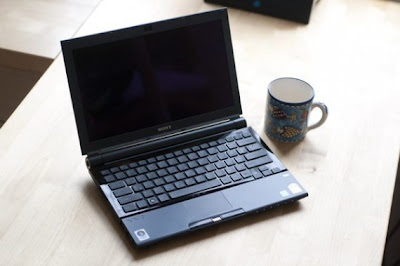
Iron:
Platform Intel Centrino Duo, Chipset Mobile Intel 945PM Express
The Intel Core 2 Duo U7500 (TZ2RMN / N) with a clock speed of 1.06 GHz or Intel Core 2 Duo U7600 processor with a clock speed of 1.2 GHz, FSB 533 MHz and 2048 KB L2 cache
Memory 1024 MB DDR-II 667 Nanya (TZ2RMN / N) , expandable to 2 GB.
Graphics Intel Graphics Media Accelerator 950 c 256 MB
HDD Toshiba MK1011 GAH volume of 100 GB, Interface Ultra 4200 rev / min
media :
Matshita DVD-RAM UJ-852S multi-format , buffer size 2MB , USB interface
Display LCD X-black LED technology Diagonal Size (inches ) - 11.1 , format resolution - 1366x768
Audio Realtek ALC262 @ Intel 82801GBM ICH7-M - High Definition Audio Controller,
A slot for memory cards such as Memory Stick Duo, Memory Stick PRO Duo and SD
WEB 0.3 megapixel camera . 320x240
interfaces :
Wi-Fi (WLAN 802.11b / g), Built-in Bluetooth ( Version ) 2.0 + EDR
Network Ethernet 10Base-T/100Base-TX/1000Base-T
4 Pin i.LINK (IEEE1394), Express card 34mm , 2x USB 2.0, VGA, RJ- 11, RJ- 45
Features:
The fingerprint scanner
Protect your hard drive shock G-sensor electronic protection HDD shock
Dimensions in mm 277h198 , 2x22 ,5 -29 , 8
Weight 1.19
You should know that you need to be patient and spend a lot of time for driver installation and configuration of this laptop ! To successfully install and guaranteed work Fn buttons and getting the maximum duration of the work required to comply with strict sequence of installing the drivers and utilities are already noticeable .
I warn you in advance that when it went on sale a laptop on board stood OS Windows VISTA. In principle drivers for Windows Vista compatible at 90 % with the operating system Windows 7.
1. Motherboard - Driver motherboard.
- Intel PCI IDE Controller
2 . Audio driver audikarty .
- Realtek High Definition Audio Driver
3 . Sony HDD Protection Filter Driver driver hard disk controller .
- Sony HDD Protection Filter Driver
4 . VIDEO Intel Graphics Media Accelerator 950 video card driver .
PCI VEN_8086 & DEV_27A2 & SUBSYS_8215104D
5 . Bluetooth driver bluetooth.
- Broadcom Bluetooth L2CAP Driver Installation
% BTWL2CAP.DeviceDesc% = BTWL2CAPST, BTHENUM {6E0C8F4C-D928- 4852 -B6B2-F0F0E0D126FA}
6. LAN Network Card
- Ethernet Marvell Yukon Ethernet Controller
PCI VEN_1148 & DEV_4320 & SUBSYS_29161259
PCI VEN_1148 & DEV_9E00 & SUBSYS_92001148
7. Card Reader card reader standard Memory Stick and SD. Potrebudetsya manual installation via Device Manager .
- MS RICOH SD / MM Card and Memory Stick driver PCI VEN_1180 & DEV_0592
- SD RICOH SD / MM Card driver PCI VEN_1180 & DEV_0843
8. SFEP Sony Firmware Extension Parser Device Driver with a sly name ID SNY5001 ( 32 and 64bit). This will require manual review all of the devices ( known and unknown ) in the " Device Manager " with the name of the ID equipment. Perhaps it will take a lot of time ! But its very important to do without these drivers will not work button! How to see the device ID of equipment in the " Device Manager " , right- click the properties in the dialog box , select the tab " Information" in the properties window , select " ID equipment " and see if our driver called SNY5001, then go ahead and install the driver downloaded from the Internet if another name for ID equipment , then we do nothing , we close and continue to seek further.
- Sony Firmware Extension Parser Device Driver 8.0.1.2
8.1. SPIC Sony Programmable I / O Control his ID SNY601. Installation is similar to Sny5001
9. Touchpad there usually is not any problems during installation.
Alps Pointing-device Driver
10 . Wi-Fi
Intel (R) PRO / Wireless 2915ABG Network Connection Adapter
PCI VEN_8086 & DEV_4220 & SUBSYS_27018086
10.1 Modem Rockwell Semiconductor Systems
HDAUDIO FUNC_02 & VEN_14F1 & DEV_2BFA & SUBSYS_104D0200
11. WEB camera . Manual Installation is similar to claim 8 (Sny5001)
- Sony Visual Communication Camera VGP-VCC7 R5U870
12 fingerprint reader . Manual Installation is similar to claim 8 (Sny5001)
TcUsb.Dev, USB VID_0483 & PID_2015
Only after the successful installation of all drivers turn to install these tools in a strict sequence :
13. Sony Shared Library and restart your computer !
- Sony Shared Library 5.7.0.06070
14. VAIO Event Service
15. Set the Setting Utility Series and restart your computer !
16 VAIO Control Center
17 VAIO Power Management
18. VAIO Smart Network of your choice
If you like this article has helped you can thank the authors purse WebMoney Z276373925574
If you for some reason it does not work or you are the unwilling to spend their time - please contact us for help . Myproizvodim complete customization , installation and solve any problems notebooks Sony VAIO.
Anofriev Gregory Dnepropetrovsk
E-mail: grisha.anofriev@gmail.com
Tags : SONY VAIO, VGN-TZ121, VGN-TZ13, VGN-TZ130N / B, VGN-TZ131, VGN-TZ132 / N, VGN-TZ132N, VGN-TZ150N / B, VGN-TZ150N / N, VGN-TZ160CB VGN- TZ160N / B, VGN TZ16GN / B VGN-TZ16N, VGN-TZ16N / B, VGN-TZ17 / N, VGN-TZ170N / B, VGN-TZ170N / N, VGN-TZ17GN / B VGN-TZ17N, VGN-TZ18 / N , VGN-TZ185N/WC, VGN-TZ18GN / X, VGN-TZ18N, VGN-TZ190N / B GN-TZ191N/XC, VGN-TZ195N/XC VGN-TZ27 / N, VGN-TZ27N, VGN-TZ28 / N, VGN -TZ28N, VGN-TZ33 / B, VGN-TZ33 / N, VGN-TZ33 / W, VGN-TZ37N / G, VGN-TZ37N / P VGN-TZ37N / R, VGN-TZ37N / X GN-TZ38N / X, VGN -TZ50B, VGN-TZ90HS, VGN-TZ90NS, VGN-TZ90S, VGN-TZ10MN/N ,VGN-TZ10XN/B, VGN-TZ11MN/N, VGN-TZ11VN/X ,VGN-TZ11XN/B ,VGN-TZ12MN/N ,VGN-TZ12VN/X ,VGN-TZ1RMN/N ,VGN-TZ1RXN/B ,VGN-TZ20MN/N ,VGN-TZ20WN/B ,VGN-TZ21MN/N ,VGN-TZ21VN/R ,VGN-TZ21VN/X ,VGN-TZ21WN/B ,VGN-TZ21XN/B ,VGN-TZ22MN/N ,VGN-TZ22VN/X ,VGN-TZ2AWN/B, VGN-TZ2RMN/N ,VGN-TZ2RXN/B ,VGN-TZ31MN/N ,VGN-TZ31MN/P ,VGN-TZ31MN/W ,TZ31VN/R ,VGN-TZ31VN/X ,VGN-TZ31WN/B ,VGN-TZ31XN/B ,VGN-TZ32VN/X ,VGN-TZ3AWN/B, VGN-TZ3RMN/N ,VGN-TZ3RXN/B
And all the other parameters of the laptop, for example, the configuration or ergonomics, formed from the point of view of preservation of minimal size and weight.
Sony VAIO VGN-TZ ALL DRIVERS For WINDOWS 7 WINDOWS 8:
Link 1: Download Letitbit.net
Link 2: Download Turbobit.net
Warning if the link broken or not working , you can write to me about it and I will try to solve this problem.
Warning if the link broken or not working , you can write to me about it and I will try to solve this problem.
Support my group on Facebook.com or Twitter join us! Thank you in advance for your support and that you have chosen my blog.
For the most part these notebooks are short-lived work " on his knees " or a brief work " at a party " - the negotiations , etc.Iron:
Platform Intel Centrino Duo, Chipset Mobile Intel 945PM Express
The Intel Core 2 Duo U7500 (TZ2RMN / N) with a clock speed of 1.06 GHz or Intel Core 2 Duo U7600 processor with a clock speed of 1.2 GHz, FSB 533 MHz and 2048 KB L2 cache
Memory 1024 MB DDR-II 667 Nanya (TZ2RMN / N) , expandable to 2 GB.
Graphics Intel Graphics Media Accelerator 950 c 256 MB
HDD Toshiba MK1011 GAH volume of 100 GB, Interface Ultra 4200 rev / min
media :
Matshita DVD-RAM UJ-852S multi-format , buffer size 2MB , USB interface
Display LCD X-black LED technology Diagonal Size (inches ) - 11.1 , format resolution - 1366x768
Audio Realtek ALC262 @ Intel 82801GBM ICH7-M - High Definition Audio Controller,
A slot for memory cards such as Memory Stick Duo, Memory Stick PRO Duo and SD
WEB 0.3 megapixel camera . 320x240
interfaces :
Wi-Fi (WLAN 802.11b / g), Built-in Bluetooth ( Version ) 2.0 + EDR
Network Ethernet 10Base-T/100Base-TX/1000Base-T
4 Pin i.LINK (IEEE1394), Express card 34mm , 2x USB 2.0, VGA, RJ- 11, RJ- 45
Features:
The fingerprint scanner
Protect your hard drive shock G-sensor electronic protection HDD shock
Dimensions in mm 277h198 , 2x22 ,5 -29 , 8
Weight 1.19
You should know that you need to be patient and spend a lot of time for driver installation and configuration of this laptop ! To successfully install and guaranteed work Fn buttons and getting the maximum duration of the work required to comply with strict sequence of installing the drivers and utilities are already noticeable .
I warn you in advance that when it went on sale a laptop on board stood OS Windows VISTA. In principle drivers for Windows Vista compatible at 90 % with the operating system Windows 7.
1. Motherboard - Driver motherboard.
- Intel PCI IDE Controller
2 . Audio driver audikarty .
- Realtek High Definition Audio Driver
3 . Sony HDD Protection Filter Driver driver hard disk controller .
- Sony HDD Protection Filter Driver
4 . VIDEO Intel Graphics Media Accelerator 950 video card driver .
PCI VEN_8086 & DEV_27A2 & SUBSYS_8215104D
5 . Bluetooth driver bluetooth.
- Broadcom Bluetooth L2CAP Driver Installation
% BTWL2CAP.DeviceDesc% = BTWL2CAPST, BTHENUM {6E0C8F4C-D928- 4852 -B6B2-F0F0E0D126FA}
6. LAN Network Card
- Ethernet Marvell Yukon Ethernet Controller
PCI VEN_1148 & DEV_4320 & SUBSYS_29161259
PCI VEN_1148 & DEV_9E00 & SUBSYS_92001148
7. Card Reader card reader standard Memory Stick and SD. Potrebudetsya manual installation via Device Manager .
- MS RICOH SD / MM Card and Memory Stick driver PCI VEN_1180 & DEV_0592
- SD RICOH SD / MM Card driver PCI VEN_1180 & DEV_0843
8. SFEP Sony Firmware Extension Parser Device Driver with a sly name ID SNY5001 ( 32 and 64bit). This will require manual review all of the devices ( known and unknown ) in the " Device Manager " with the name of the ID equipment. Perhaps it will take a lot of time ! But its very important to do without these drivers will not work button! How to see the device ID of equipment in the " Device Manager " , right- click the properties in the dialog box , select the tab " Information" in the properties window , select " ID equipment " and see if our driver called SNY5001, then go ahead and install the driver downloaded from the Internet if another name for ID equipment , then we do nothing , we close and continue to seek further.
- Sony Firmware Extension Parser Device Driver 8.0.1.2
8.1. SPIC Sony Programmable I / O Control his ID SNY601. Installation is similar to Sny5001
9. Touchpad there usually is not any problems during installation.
Alps Pointing-device Driver
10 . Wi-Fi
Intel (R) PRO / Wireless 2915ABG Network Connection Adapter
PCI VEN_8086 & DEV_4220 & SUBSYS_27018086
10.1 Modem Rockwell Semiconductor Systems
HDAUDIO FUNC_02 & VEN_14F1 & DEV_2BFA & SUBSYS_104D0200
11. WEB camera . Manual Installation is similar to claim 8 (Sny5001)
- Sony Visual Communication Camera VGP-VCC7 R5U870
12 fingerprint reader . Manual Installation is similar to claim 8 (Sny5001)
TcUsb.Dev, USB VID_0483 & PID_2015
Only after the successful installation of all drivers turn to install these tools in a strict sequence :
13. Sony Shared Library and restart your computer !
- Sony Shared Library 5.7.0.06070
14. VAIO Event Service
15. Set the Setting Utility Series and restart your computer !
16 VAIO Control Center
17 VAIO Power Management
18. VAIO Smart Network of your choice
If you like this article has helped you can thank the authors purse WebMoney Z276373925574
If you for some reason it does not work or you are the unwilling to spend their time - please contact us for help . Myproizvodim complete customization , installation and solve any problems notebooks Sony VAIO.
Anofriev Gregory Dnepropetrovsk
E-mail: grisha.anofriev@gmail.com
Tags : SONY VAIO, VGN-TZ121, VGN-TZ13, VGN-TZ130N / B, VGN-TZ131, VGN-TZ132 / N, VGN-TZ132N, VGN-TZ150N / B, VGN-TZ150N / N, VGN-TZ160CB VGN- TZ160N / B, VGN TZ16GN / B VGN-TZ16N, VGN-TZ16N / B, VGN-TZ17 / N, VGN-TZ170N / B, VGN-TZ170N / N, VGN-TZ17GN / B VGN-TZ17N, VGN-TZ18 / N , VGN-TZ185N/WC, VGN-TZ18GN / X, VGN-TZ18N, VGN-TZ190N / B GN-TZ191N/XC, VGN-TZ195N/XC VGN-TZ27 / N, VGN-TZ27N, VGN-TZ28 / N, VGN -TZ28N, VGN-TZ33 / B, VGN-TZ33 / N, VGN-TZ33 / W, VGN-TZ37N / G, VGN-TZ37N / P VGN-TZ37N / R, VGN-TZ37N / X GN-TZ38N / X, VGN -TZ50B, VGN-TZ90HS, VGN-TZ90NS, VGN-TZ90S, VGN-TZ10MN/N ,VGN-TZ10XN/B, VGN-TZ11MN/N, VGN-TZ11VN/X ,VGN-TZ11XN/B ,VGN-TZ12MN/N ,VGN-TZ12VN/X ,VGN-TZ1RMN/N ,VGN-TZ1RXN/B ,VGN-TZ20MN/N ,VGN-TZ20WN/B ,VGN-TZ21MN/N ,VGN-TZ21VN/R ,VGN-TZ21VN/X ,VGN-TZ21WN/B ,VGN-TZ21XN/B ,VGN-TZ22MN/N ,VGN-TZ22VN/X ,VGN-TZ2AWN/B, VGN-TZ2RMN/N ,VGN-TZ2RXN/B ,VGN-TZ31MN/N ,VGN-TZ31MN/P ,VGN-TZ31MN/W ,TZ31VN/R ,VGN-TZ31VN/X ,VGN-TZ31WN/B ,VGN-TZ31XN/B ,VGN-TZ32VN/X ,VGN-TZ3AWN/B, VGN-TZ3RMN/N ,VGN-TZ3RXN/B
Available link for download
Subscribe to:
Posts (Atom)